

When choosing a graphics card, many gamers compare GPU models, clock speeds, or benchmark scores. While these specifications are important, one component often has an equally significant impact on gaming performance, Video RAM, commonly known as VRAM. In fact, a lot of gamers may have not heard about this and taking advantage of VRAM guide for gaming can prove to be very useful.
For instance, VRAM determines how much graphical data your graphics card can store and access quickly, directly affecting image quality, frame rates, and gameplay smoothness. Understanding how it works can help gamers make informed decisions and avoid investing in hardware that may struggle with future game releases.
What is VRAM and Why Does It Matter?
VRAM is dedicated memory built into a graphics card. Unlike system RAM, which is shared across the operating system and applications, VRAM is reserved exclusively for graphics processing tasks. The GPU uses VRAM to store data that it needs immediate access to, including:
- High-resolution textures
- 3D models
- Shadow maps
- Lighting information
- Frame buffers
- Geometry data
- Shader resources
Because VRAM is located directly on the graphics card, it provides much higher bandwidth than system memory, allowing the GPU to retrieve graphical assets rapidly during gameplay.
If enough VRAM is available, the GPU can keep these assets readily accessible, resulting in smoother rendering and fewer interruptions. If VRAM is exhausted, the graphics card must retrieve data from the much slower system RAM through the PCI Express interface, which can significantly reduce performance.
How VRAM affects Gaming Performance?
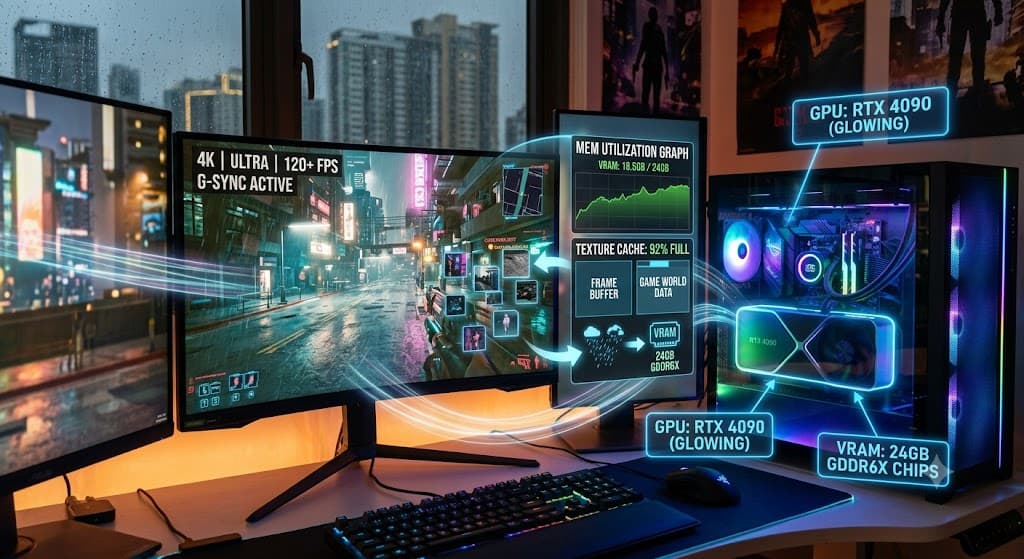
The amount of VRAM required depends on several factors, including game complexity, display resolution, texture settings, ray tracing, and installed graphics mods. At lower resolutions such as 1080p, many games operate comfortably with moderate VRAM capacities. However, increasing the resolution to 1440p or 4K dramatically increases the amount of graphical data that must be stored.
Higher texture quality settings are particularly demanding because detailed textures consume considerably more memory. Insufficient VRAM can cause several issues:
- Reduced frame rates
- Texture pop-in
- Stuttering during gameplay
- Longer loading times
- Automatic reduction of graphics settings
- Inconsistent frame pacing
These problems become more noticeable in open-world games, large multiplayer environments, and titles featuring extensive visual effects.
Even if a GPU has strong processing power, limited VRAM can become the bottleneck that prevents the card from delivering its full potential.
Choosing the Right VRAM Capacity
There is no universal VRAM requirement because gaming needs vary based on hardware, display resolution, and the types of games being played. However, understanding general usage patterns helps guide purchasing decisions and typical considerations include:
- 1080p gaming: Moderate VRAM capacities are sufficient for most modern titles using medium to high settings.
- 1440p gaming: Higher VRAM capacities provide greater flexibility for high-resolution textures and demanding visual effects.
- 4K gaming: Large VRAM capacities become increasingly important due to significantly larger texture and rendering requirements.
- Ray tracing: Advanced lighting techniques consume additional memory alongside GPU processing resources.
- Modded games: Community-created texture packs and visual enhancements can dramatically increase VRAM usage.
Future-proofing is another important factor. Games continue to increase texture resolution and graphical complexity, meaning today’s adequate VRAM capacity may become limiting several years later.
VRAM is only One Part of Graphics Performance
Although VRAM is important, it should not be viewed in isolation. Overall gaming performance depends on the balance between several hardware components. Other important factors include:
- GPU architecture
- Processing cores
- Memory bandwidth
- Memory speed
- CPU performance
- System RAM capacity
- Storage performance
For example, a graphics card with abundant VRAM but limited processing power may still struggle with demanding games.
Conversely, a powerful GPU paired with insufficient VRAM may be unable to utilize its processing capabilities fully. A balanced system ensures that no single component unnecessarily restricts overall gaming performance.
Planning for Today’s Games and Tomorrow’s Releases
Game development continues to push hardware requirements forward. High-resolution textures, realistic lighting, larger environments, and advanced rendering technologies all increase memory demands.
Many newer game engines stream enormous amounts of graphical data dynamically as players explore expansive worlds. Having sufficient VRAM allows these assets to remain available without frequent transfers from slower system memory.
Players planning new PC builds or graphics card upgrades should consider both current and future gaming needs. Choosing a card based solely on today’s minimum requirements may limit performance as games become more demanding.
Gamers who create content, stream gameplay, or use GPU-accelerated creative software can also benefit from additional VRAM, as many professional applications rely on graphics memory for rendering and processing large projects.
Considering intended workloads alongside gaming requirements helps maximize the long-term value of a graphics card investment.
Smart Graphics Card Decisions Begin with Understanding VRAM
VRAM determines how efficiently a GPU can store and access the textures, models, and visual data required for modern games. While processing power remains essential, insufficient VRAM can quickly become a performance bottleneck, leading to stuttering, lower frame rates, and reduced image quality.
The best graphics card is not simply the one with the highest benchmark score, it is the one that offers the right balance of GPU performance, memory capacity, bandwidth, and overall system compatibility.